Broken Link Tracker
The Broken Links feature allows site administrators to monitor and manage URLs that no longer lead to an active page or resource. This is particularly useful when migrating from another documentation platform, restructuring content, or identifying outdated links. Docvora automatically tracks broken links and analyses incoming requests to help distinguish genuine visitors from automated bots. Each broken link is assigned to one of three categories: Needs Review: Links that may require attention, such as outdated URLs that could benefit from a redirect to an existing page. Suspicious: Requests likely originating from bots or automated systems attempting to access invalid routes. Ignored: Links that have been manually ignored or repeatedly deleted from the tracker. Redirects Redirects allow broken links to automatically forward visitors to a new or existing page, helping maintain access to content when URLs change. A redirect can be configured for any recorded broken link by assigning a destination URL. Once configured, the entry is moved to the Redirected category. Redirect Suggestions Docvora automatically identifies potential redirect destinations by comparing broken URLs against existing page slugs. For example, if /spaces/content-editor/pages is recorded as a broken link, Docvora may suggest /spaces/content/pages as a possible destination if that page exists. These suggestions help simplify the process of resolving broken links, particularly following content migrations or structural changes. Deleting Broken Links Broken link entries can be removed from the tracker using either of the following methods: Manual Deletion: Select one or more broken link entries and use the Delete button to remove them. Clean Up Bot Entries: Select Clean up bot entries to automatically remove entries identified as suspicious or bot-generated traffic. Removing an entry clears it from the tracker but does not create a redirect or resolve the original broken URL. Broken links is available on all Docvora plans.
The Broken Links feature allows site administrators to monitor and manage URLs that no longer lead to an active page or resource. This is particularly useful when migrating from another documentation platform, restructuring content, or identifying outdated links.
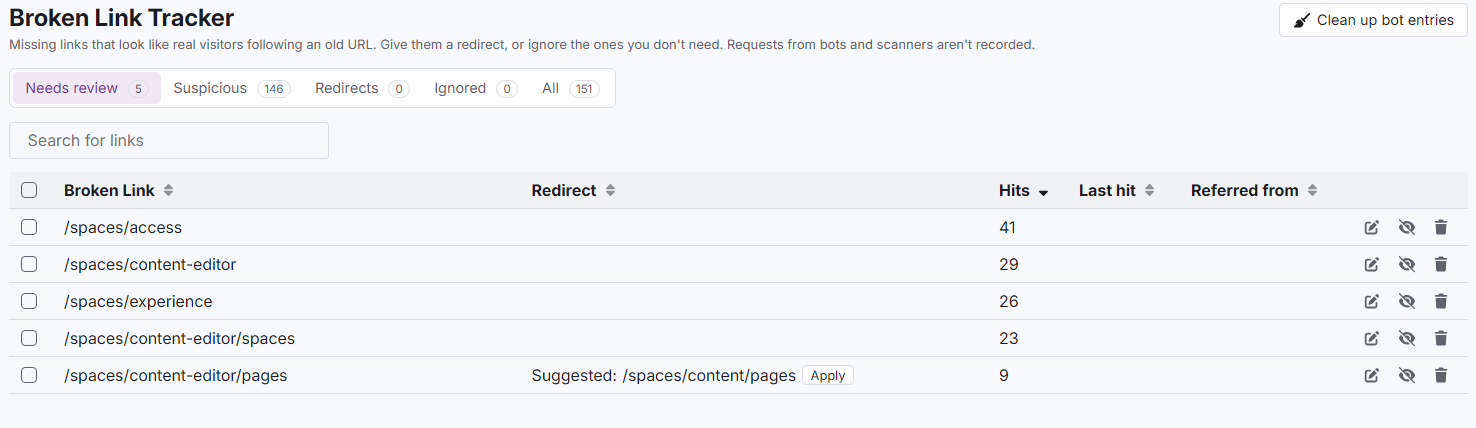
Docvora automatically tracks broken links and analyses incoming requests to help distinguish genuine visitors from automated bots. Each broken link is assigned to one of three categories:
Needs Review: Links that may require attention, such as outdated URLs that could benefit from a redirect to an existing page.
Suspicious: Requests likely originating from bots or automated systems attempting to access invalid routes.
Ignored: Links that have been manually ignored or repeatedly deleted from the tracker.
Redirects
Redirects allow broken links to automatically forward visitors to a new or existing page, helping maintain access to content when URLs change.
A redirect can be configured for any recorded broken link by assigning a destination URL. Once configured, the entry is moved to the Redirected category.
Redirect Suggestions
Docvora automatically identifies potential redirect destinations by comparing broken URLs against existing page slugs.
For example, if /spaces/content-editor/pages is recorded as a broken link, Docvora may suggest /spaces/content/pages as a possible destination if that page exists.
These suggestions help simplify the process of resolving broken links, particularly following content migrations or structural changes.

Deleting Broken Links
Broken link entries can be removed from the tracker using either of the following methods:
Manual Deletion: Select one or more broken link entries and use the Delete button to remove them.
Clean Up Bot Entries: Select Clean up bot entries to automatically remove entries identified as suspicious or bot-generated traffic.
Removing an entry clears it from the tracker but does not create a redirect or resolve the original broken URL.
Broken links is available on all Docvora plans.